Showing posts with label Operator & Expression in C. Show all posts

Operator precedence

Precedence of Operators 
The precedence of operators is a rule which decides the sequence (or order) in which operators are solved. Operators are solved in highest to lowest precedence order.
   

The Order of Evaluation
In an expression containing different kind of operators, the correct order of evaluation must be followed so that the outcome is correct. There is a description of rules that how an expression is solved by your program.
  1. The expressions in parenthesis and function calls are solved first. If parentheses are nested then they are solved in inner to outer order.
  2. Then increment and decrement operators are solved. If postfix form is used, then the variable is replaced by its original value. If prefix form is used then the variable is replaced by its modified i.e. incremented value.
  3. All typecasting are performed.
  4. Then arithmetic operators are solved. Multiplication, Division and Modulus are solved first. Then Addition and Subtraction operators are solved. If two or more operators have same precedence level then they are solved according to associativity rule.
  5. All relational operators are solved. <, >, <= and >= are solved first. Then = = and != are solved.
  6. All logical operators are solved. AND operator is solved first. Then OR is solved.
  7. If, conditional operator is present then it is solved.
  8. At last assignment operators are solved.     
Type Conversions in C
Type conversion refers to the conversion of one data type into other. This either happens automatically or performed by user. When this happens automatically, it is called Automatic Type Conversion (or Implicit Type Conversion). But when performed by user is called User Defined Type Conversion (or Explicit Type Conversion). Automatic type conversion includes Type Promotion, Type Demotion and Truncation. Whereas User defined type conversion includes typecasting - which involves the uses the cast operator. 

Automatic Type Conversions
All types of automatic type conversions are actually performed by compiler. This process is called Coercion. Each type of automatic type conversion is discussed here in detail. 

Type Promotion in Expressions
Data types can be arranged into “lower to higher” order. A lower data type is the one which has small memory size and range, and a higher data type is the one which has large memory size and range. Therefore character is the “lowest” data type and double is the highest one. The Hierarchy of Data types can be easily understood from the following diagram.    
Type Promotion

                                                                
Type promotion refers to the conversion of a lower data type into higher one, directly. This frequently occurs in expression when a lower data type is operated with higher one. A character is converted to integer directly, an integer is converted to float or double. And a float is converted to double. Therefore, in an expression which contains different types of variables the result is obtained in higher data type.
Consider the following declarations –
char ch = ’A’;
int i = 5;
float f = 25.25f;
double d = 225.25;
double result;
Now consider a statement, build using these variables –
result = (ch / i)  + (f / i) + (d / f) + (d / i);
The expression in right hand side is solved like this– the ch in sub expression (ch/i) replaced by the ASCII value of ’A’ that is 65. Then it is operated with the value of i, 5. The i in sub expression (f / i) is replaced by 5 and this 5 is promoted to float 5.0. The f in sub expression (d / f) is replaced by the value 25.25f and this is promoted to double 25.25. The i in sub expression (d / i) is replaced by its value 5 and then this is promoted to double 5.0. The results obtained in each sub expression are 13, 5.05, 8.920792, and 45.05.
Now, they are added. Integer 13 is added with float 5.05 gives float 18.05. This float 18.05 is added with double 8.920792, gives a double value 26.970792. Again, this double value 26.970792 is added with double 45.05, gives the final result 72.020792 as double. Hence the final result obtained as double which was the highest data type in the original expression.       
This is how it happens –


Type Promotion in Assignments
When a lower data type is assigned to higher one the value of lower data type is first promoted and then stored in the higher data type. For example, if x is a integer variable with value 50 and y is a real (float or double) variable then on writing the statement –
y = x;
the value of x is first replaced at RHS and promoted to 5.0. As shown here –
y = 5.0;
Now, it will be assigned to y. The value in x will remain 5.
When you assign a character to integer the ASCII value of that character is assigned to the integer.
This is shown here –
char ch = ’A’;
int x;
x = ch; // assigning ch to i will assign the ASCII value of ’A’ i.e. 65, to x
printf(“Value of x = %d”,x);
The output is:
Value of x = 65
Type Demotion
Type Demotion occurs when a higher data type is assigned to a lower one. In this case the value of the higher data type is so converted that it can fit into the lower data type. For example, an integer is always capable to hold all type of character i.e. ASCII values. But character is not enough to hold all type of integer values. Therefore, when you assign an integer value to a character, the value is so converted (i.e. demoted) that it can fit into the character. If x is an integer with value 200 and ch is a character variable, then on assigning x to ch the value of x, 200 will be converted to fit into ch. For this 256 is subtracted from 200 this gives -56. This is in the range of character. Following example illustrates this thing.
/* Proram to illustrate type demotion */
     #include<stdio.h>
     #include<conio.h>

     int main(void)
     {
        char ch;
        int x = 200;
        clrscr();
        ch = x;
        printf("The value of ch = %d",ch);
        getch();
        return 0;
     }
     Output is –
     The value of ch = -56

From the above example it is clear that you must use integer variables to hold values which are out of character’s range. In the above example the value chosen is 200. Clearly, it is outside the range of character (-128 to +127). That’s why type demotion occurred.  If the value were within the range of character, for example 100, then no type demotion would occur.    
In case of integers, when a value out of range is assigned to the variable, 65536 is subtracted from that value so that it can fit into integer. For example if you assign 40000.00 to an integer, the integer will get
-25536, which has been calculated as 40000 – 65536. Here is the program to illustrate this.
/* Program to illustrate type demotion */

     #include<stdio.h>
     #include<conio.h>

     int main(void)
     {
        int x = 40000.00;
        clrscr();
        printf("The value of x = %d",x);
        getch();
        return 0;
     }

     Output is –
     The value of x = -25536

From the above program it is clear that you must use float or double variables to hold values which are out of integer’s range. In chapter 7 you will study how to modify the range and memory size of a data type so that it can fulfill our needs. You will learn the techniques that can make an integer to hold a value which is outside the range -32768 to + 32767.
The Secret of 256 and 65536
Truncation
When you assign a real value to an integer the fractional component of that real gets lost and the integer portion is assigned to the integer. This is known as truncation. For example, if you assign 27.36 to an integer i than i will get only 27, the fractional part .36 will lost. Here is the code to clear this –

int i;
i = 27.26;
printf(“Value of i = %d”,i);
The output is –
Value of i = 27

User Defined Type Conversions (or Explicit Type Conversions or Typecasting)
User defined type conversions or explicit type conversions are actually called typecasting. Typecasting refers to the conversion of one data type into other, explicitly. The mechanism of typecasting uses cast operator. The cast operator is actually the type conversion operator. Using this, you can convert one type into other, or more specifically, a value of one type into a value of another type. The general form of cast operator is –
(target type) operand
Target type is the data type required. And operand is the variable or constant that you want to cast into the target type. Remember that cast is a unary operator.
Consider a declaration of x and y –
int x = 10, y = 3;
When x is divided by b, the result would be 3.i.e the integer quotient because x and y both are integer here. On writing x/y the result would be always 3 (not 3.33….).  Suppose, you want to obtain the real quotient i.e. 3.33…. For this, either x or y must be declared as real (i.e. float or double). But it is possible that the rest of the program’s code might not permit this. Or changing the type of x or y (from int to float or double) would affect the other parts of the program –  for example – if you are calculating x % y somewhere in your program, then changing x and/or y from int to float, will make this calculation illegal. In this situation, you must use a cast to temporary change the value of x or y from integer to float (or double), just for the purpose of division. And this cast will not change the actual type of x and y.     
The division x / y now, would be written as –
(float) x / y
this would generate the required quotient 3.33…..   See, the x is preceded by the float keyword surrounded in parenthesis. This is the cast operator which will change the value of x from integer to float. Not permanently, just for the purpose of division. And x will remain an integer after this typecasting. Here is the step by step description that shows the working of the cast operator.
  • (float) x / y                typecasting of x to float
  • (float) 10 / 3              values of x and y are replaced
  • 10.0 / 3                      the 10 is now 10.0, cast has been done
  • 3.333333                   the required result

The same result can be obtained by applying the cast to y, instead of x. This is shown here –
  •  x / (float) y                  typecasting of y to float
  •  10 / (float) 3                values of x and y are replaced
  • 10 / 3.0                        the 3 is now 3.0, cast has been done
  • 3.333333                     the required result

Now, consider one more case. If x and y declared as –
float x = 10.0f, y = 3.0f;
Then the result of x / y would always be 3.33333. To perform an integer division, both x and y will require a cast to integer. Changing either x or y, would not generate the desired result. Because casting a single operand into integer would let the other to remain a real. And the division will generate a real quotient, because, when an integer is operated with a real the result comes as real. So, x and y both must be cast to integer. This is shown here.
  •  (int) x / (int) y              casting of x and y both to integer
  •  (int) 10.0 / (int) 3.0      values of x and y are replaced
  • 10 / 3                           10.0 and 3.0 are now 10 and 3, cast has been performed
  •  3                                  3 is the required result, the quotient of integer division

Here is the program that shows the casting of integer to float
/* Explicit Conversion of integer to float */

     #include<stdio.h>
     #include<conio.h>

     int main(void)
     {
        int x = 10, y = 3;
        float quotient;
        clrscr();
        printf("x = %d y = %d\n",x,y);
        quotient = (float) x / y;
        printf("quotient = %f",quotient);
        getch();
        return 0;
     }
            The output is –
     x = 10 y = 3
     quotient = 3.333333
Please note that in the above program it is necessary to define the quotient as float. Because
(float) x / y would give the result 3.333333.
And here is the program that shows the casting of floats to integer.
/* Explicit Conversion of floats to integer */

     #include<stdio.h>
     #include<conio.h>

     int main(void)
     {
        float x = 10.0, y = 3.0;
        int quotient;
        clrscr();
        printf("x = %f y = %f\n",x,y);
        quotient = (int) x / (int) y;
        printf("quotient = %d",quotient);
        getch();
        return 0;
     }
The output is –
     x = 10.000000 y = 3.000000
     quotient = 3

Overflow and Underflow in Expressions

As you know all data types have predefined ranges. In expressions, when a resultant value of an operation exceeds the maximum value defined in the range, this is called overflow, and when it is below the minimum value in the range, this is called underflow.   

For example, consider three integer variables declared as –
int x = 20000, y = 30000, z;
Suppose, you want to add x and y and store the result in z.  Simply, you will write this –
z = x + y;
To, print the result of x + y you will write this –
printf(“x + y = %d”,z);
But here is the output –

Strange! It is not 50000. Why? The reason is simple. When the expression x + y is evaluated values of x and y are obtained and added. Adding 20000 and 30000 generates the result 50000. But, according to the rules of the language, the result of the operation between two integers must be an integer. You may ask 50000 is indeed an integer then what’s the problem. Just think about the range of integer. It is -32768 to +32767. So the resultant integer must be in the range. Here, 50000 exceed the maximum value of the range. So, to fit it into the range, 65536 is subtracted. This gives -15536, and then it is assigned to z. The value of z is then printed.  Since the result of the expression x + y has cross the maximum value of the range, we will say that an overflow has occurred. 

Next : Relational Operator
Previous : Arithmetic Operators 
Const Qualifier and Typedef

The const Qualifier
const एक Keyword है इसको const qualifier भी कहते है। जब किसी Variable को const keyword के साथ declare करते है (Variable से पहले const keyword लगाते है) - इसका मतलब यह की variable की value program के Runtime बदल नही सकते है। अगर इस Value को बदलना चाहेगे तो Compile time Error आयेगा।

The const is a keyword. Also called const qualifier. When a variable’s declaration is qualified (i.e. preceded) with const keyword -  it means that the variable will remain stable to a particular value, given in the declaration. And the value of the variable cannot be changed by the program in runtime. Also, any attempt to change the value of the variable will result into a compile time error.
To understand the concept first consider a normal declaration –

int x = 0;


Here x is set to the value zero. If you want to modify(change) the value of x some where in your program then you can easily do this by using a statement like x = 100 or x = 500. Also you can take the value for x from the keyboard using scanf as –  scanf(“%d”, &x);
Now, qualify (i.e. precede the same declaration by const keyword. As shown here –
                            const int x = 0;
After the const keyword is applied, the variable x is now stable at value zero. Any further attempt to change the value of x will result into a compile time error – cannot modify a const object. That is, you, now, can use x, but can not change the value of x by statements like x = 100 or x = 500 or by any other means such as using increment/decrement operators. Also, you cannot use scanf( ) to take the value for x from keyboard. So, writing scanf(“%d”, &x); is illegal now, because const has been applied to the x. This all means that the variable will be – or behave as – a constant after the const qualifier is applied. Generally, const qualifier is applied to those variables, which you want to use, but don’t want to change throughout the program.      When you use const qualifier, the variable must be given a value. You cannot use the declaration without a value. For example, a statement like –
const int x;
is illegal. Because the variable is not set to a value. It must be like this –
const int x = 0;            (stable at zero)
or
const int x = 100; (stable at 100)
The const keyword can be applied to any type – character, integer, float or double.   By convention, a const qualified variable is declared in UPPER CASE i.e. in capital. So that it can be easily noticed in program and among other variables. For Example –
const double PI = 3.142F;
const int TOTAL = 100;
Here is an example to demonstrate the use of const.


/* Calculating Area and Perimeter of Circle */

#include<stdio.h>
#include<conio.h>

int main(void)
{
   const double PI = 3.142;
   double radius,area,peri;
   clrscr();
   printf("Enter the radius:");
   scanf("%lf",&radius);
   area = PI*radius*radius;
   peri = 2*PI*radius;
   printf("Area of circle = %lf\n",area);
   printf("Perimeter of circle = %lf",peri);
   getch();
   return 0;
}

Output:
Enter the radius:7.0
Area of circle = 153.958000
Perimeter of circle = 43.988000


Type Definition 
C allows you to create an alias (alternative name) for a type. This process is known as Type Definition. The keyword typedef is used when you create an alias for a type. After the alias has been created, you can use the original keyword as well as the alias. The general for of creating the alias is –
typedef type alias;
Here, type is the data type and alias is the alternative name. For example, the following statement –
typedef int integer;                       
will create an alias integer, for the keyword int. Now, you can use both - the original keyword int and the alias integer - in the same sense. For example, now the declarations –
int x;
        and
integer y; 
both are valid. The first creates an integer variable x and the second creates an integer variable y. x is created using the original keyword int and y is created using the alias integer.


Lvalue and Rvalue (Pronounced as “el value” and “are value”)
The term Lvalue stands for Location value and Rvalue for Read value. An lvalue is generally a variable to which a value can be assigned. And rvalue is a constant, variable or expression which can be assigned i.e. given to an lvalue i.e. a variable. As you know you can use only a single variable on the left hand side of an assignment statement. As in the following code –
int x, y, z;
x = 10;
y = 20;
z = 30;
Consider these three assignment statements. x = 10, y = 20, z = 30. Respectively, these three copies the value 10, 20 and 30 to x, y and z. In all assignment statements given here, the LHS of = have a variable. Therefore, x, y and z are lvalues in these assignment statements. Because they can be at the left of =. And the values 10, 20, 30 which can be assigned to these lvalues are called rvalues. Because they are used at the right of =. Also, an rvalue can be a variable from which can be copied. As in x = y; x is lvalue and y is rvalue. An rvalue can be a constant. As in x = 10; 10 is rvalue. An rvalue can be an expression. As in x = y + z; y + z gives the result and then it is copied in x. So y + z is an rvalue. Those functions that return a value can be used as rvalues. For example –
r = sqrt(3.0);
is perfectly valid because the function sqrt( ) returns a value. However, the following statement –
s = clrscr( );
is invalid because clrscr( ) does not return any value. So rvalue will not be available. And compiler will flag the error -   rvalue required.
If you write x = y then it will copy the value of y into x. If you write this in reverse i.e. y = x then it will copy the value of x into y. Because assignment operator = always copies the result of RHS into the variable at LHS. However, the statement x = 10 cannot be written as 10 = x. Because, the value of x cannot be copy to 10. Therefore 10 is not an lvalue. A constant cannot be an lvalue. Similarly, x = y + z cannot be written as y + z = x. Because the value of x cannot be copied over y + z. So, an expression like y + z cannot be an lvalue. When an lvalue is not available compiler flags the error -  lvalue required.


NEXT : Conditional statements
PREVIOUS : Conditional Operator

Conditional Operator

Conditional Operator
Conditional Operator को Ternary operator भी कहते है। इसमें दो symbols ? और : होते है . 
Conditional Operator को Use करने का सामान्य तरीका

Syntax 

expression1 ? expression2 : expression3

If the expression1 evaluates to a non zero value (i.e. true) then expression2 is solved otherwise expression3 is evaluated. Consider an example –
x % y = = 0 ? x++ : y++ ;
Here, if x is divisible by y then x will be incremented otherwise y will be incremented. The true use of this operator is discussed in next chapter – Selection 

Example 
*/ Program to check whether the number is equal to 10 or not */

          #include<stdio.h>

         #include<conio.h>

         int main(void)

        {
            int number;
            clrscr();
           printf("Enter a number");
           scanf("%d",&number);
           number ==10? printf("Right"): printf("Wrong");
           getch();
           return 0;
        }

Output :
Enter a number 10
Right

दोबारा रन कराने पर


Enter a number 20

Wrong


NEXT   : Miscellaneous
PREVIOUS :  Bitwise Operators


Bitwise Operators

Bitwise Operators
Bitwise operators work on bits. They are divided into two categories – Bitwise Shift operators and Bitwise Logical Operators. First we will discuss shift operators. 

Bitwise Shift Operators << and >>
The two shift operators are left shift and right shift. They are written as << and >>. The left shift operator moves (i.e. shifts) the bits of its operand to the left. The right shift operator moves the bits of its operand to the right. In left shift, the vacated bits on right are filled with zeros. In right shift, the vacated bits on left are filled with the sign bit. 
Left Shift Operator 
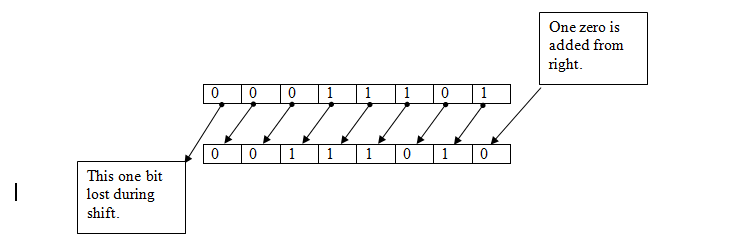
Consider a bit pattern 00011101, stored in a byte. When this pattern is shifted to left by one, using left shift operator <<, then each bit in pattern moves to left by one position. The leftmost one bit is lost and one zero added from right.  This is shown here –


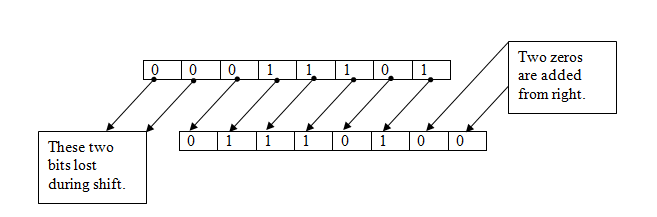
When the same bit pattern is shifted to left by two, each bit in pattern moves to left direction by two positions. And, two leftmost bits lost. Also, two zeros are added from right. This is shown here –

The binary equivalent of +1234 (or 1234) is 0000010011010010. Now understand how left shift operator works. On writing 1234 << 2, the left shift operator will shift all the bits of 1234 to left by 2 positions and the two vacated right bits are filled with zero. Mean to say, 1234 << 2 is actually 0000010011010010 << 2 which gives 0001001101001000 this is 4936. So, 1234 << 2 is equivalent to 1234 × 22 which gives 1234 × 4 = 4936.  
The process is shown here with the help of diagram.

Similarly, 1234 << 3 shifts all the bits to left by 3 positions. The vacated 3 bits on right are filled with zeros as prescribed. Mean to say, 1234 << 3 is 0000010011010010 << 3 which gives 0010011010010000 i.e. 9872. So, 1234 << 3 is equivalent to 1234 × 23 which gives 1234 × 8 = 9872.  
From the above examples, it is clear that the general form using left shift operator is –
operand << position
Here, operand has a bit pattern and position is the position by which you want to shift each bit towards left. 
Shifting the bits of an operand by N position is equivalent to multiply the operand by 2N. For example, 1234 << 3 gives 9872. Also 1234 × 23 = 9872. Thus, 1234 << 3 = 1234 × 23 which gives 1234 × 8 = 9872. 

While using left shift operators, if the original value of the sign bit (which is the left most bit) changes, then the sign changes. In the above two examples 1234 << 2 and 1234 << 3 the value of sign bit remains 0 before and after the shift. So the results after the shift, 4936 and 9872, have the same sign as the operand 1234 i.e. positive. Consider one example more. 1234 << 5 will shift the bits by 5 positions. The left most five bits will lost and the left most sign bit will be 1. This will cause the result to be negative. 1234 << 5 is 0000010011010010 << 5 which gives 1001101001000000 this is -26048. In the result sign is negative, because, the value of the sign bit has been changed after the shift. By our formula 1234 << 5 is equal to 1234 × 25 = 1234 × 32 = 39488. Because 39488 exceed the range of integer, it is converted to fit into integer. For this, 65536 is subtracted from 39488 which gives -26048. This process is shown here –

If a negative number is operated with left shift operator and its sign bit, which is already 1, changes to zero, the result comes positive. For example, -1234 is 1000010011010010. Here sign bit is one. Now, 1234 << 1 shifts the bits in pattern to left by one position. The resulting pattern is 0000100110100100. Here sign bit is zero which denotes a positive number. The resulting bit pattern 0000100110100100 is actually 2468.   

Right Shift Operator
The right shift operator shift the bits of its operand to right by the position specified. The right most bits lost during shift. The main difference between left shift and right shift is that in left shift, vacated bits are filled with zeros only, but in right shift the vacated bits are filled with the value of sign bit i.e. in right shift the vacated bits are filled by either zeros or ones depending upon the value of sign bit. For example the bit patters for 1234 is 0000010011010010. Here sign bit is zero. If you write 1234 >> 3 then it will shift the bits to right by 3 positions and the three rightmost bits will lost. Further, the three vacated bits at left will be filled with zero because the sign bit is zero in original pattern. Therefore the result of 1234 >> 3 is 0000000010011010 which is 154. Now consider -1234. The bit pattern for -1234 is 1000010011010010. Here sign bit is one. So, if you write -1234 >> 3 then the three leftmost vacated bits will be filled with one because the sign bit in original pattern is 1. Therefore the result of -1234 >> 3 is 1111000010011010 which is –28826.These two examples are presented here.


B
Bitwise Logical Operators
The bitwise logical operators are bitwise AND, bitwise OR and bitwise XOR. These three are represented by &, | and ^ respectively. Each one is a binary operator. They work on the bit pattern of their operands. AND gives result 1 when both the bits are 1 otherwise it gives zero. OR gives 1, when at least one bit is 1. When both bits are zero it gives zero. XOR gives 1 when one bit is zero and other is one. If both are 1 or both are 0 it gives zero. (Just think 0 as false and 1 as true, you will understand easily.)
The following table shows the working of bitwise logical operators.  
  

First bit
b1
Second bit
b2
AND
b1 & b2
OR
b1 | b2
XOR
b1 ^ b2
0
0
0
0
0
0
1
0
1
1
1
0
0
1
1
1
1
1
1
0

Now see, how bitwise logical operators works. Suppose x =  1234 and y = 5678. The binary equivalents of 1234 and 5678 are 0000010011010010 and 0001011000101110 respectively. Writing x & y will perform a bitwise AND operation between the bit patterns of 1234 and 5678. As shown here –
0000010011010010        0001011000101110      & operation on each pair of bits which are corresponding to each other 
0000010000000010   
The resulting bit pattern is 0000010000000010 which is 1026 in decimal.  So result of x & y or 1234 & 5678 is 1026.
If we write x | y then it will perform an bitwise OR operation between the bit patterns of 1234 and 5678 as shown here –
0000010011010010        0001011000101110      | operation on each pair of bits which are corresponding to each other 
            0001011011111110 The resulting bit pattern is 0001011011111110 which is 5886 in decimal. So result of x | y or 1234 | 5678 is 5886. 
Similarly, if we write x ^ y then it will perform an XOR operation between the bit patterns of 1234 and 5678. As shown here –
0000010011010010        0001011000101110      ^ operation on each pair of bits which are corresponding to each other 
            0001001011111100 The resulting bit pattern is 0001001011111100 which is 4860 in decimal. 
So result of x ^ y or 1234 ^ 5678 is 4860.
Please note that bitwise logical operators don’t change their operands; they just use them and gives the result of the operation. Here is the program to show the working of bitwise logical operators.
/* Bitwise logical Operators */

#include<stdio.h>
#include<conio.h>

int main(void)
{
   int x = 1234, y = 5678, z;
   clrscr();
   printf("x = %d y = %d\n",x,y);
   z = x & y;
   printf("x & y =%d\n",z);
   z = x | y;
   printf("x | y = %d\n",z);
   z = x ^ y;
   printf("x ^ y = %d\n",z);     printf("x = %d y = %d\n",x,y);
   getch();
   return 0;
}
Output:
x = 1234 y = 5678
x & y = 1026
x | y = 5886
x ^ y = 4860
     x = 1234 y = 5678
As you can see, no change has been made to x and y during bitwise logical operations. They are just used but not changed. 

Bitwise Assignment Operators
The second subgroup of shorthand assignment operators is bitwise assignment operators. They are given here –
Operator
Name

<<=
Left shift assignment

>>= 
Right assignment

&=
Bitwise AND assignment

|=
Bitwise OR assignment

^=
Bitwise XOR assignment


A Symbol can represent several operators 
Depending upon the context, a symbol can represent different operators. For example, consider &. This symbol when attached to a variable denotes address of operator for example - &x and when used between two variables / values such as x & y denotes bitwise AND. When & is used in pair i.e. &&, it denotes logical AND as in    x < y && x < z.

Consider one more example, the + symbol. It denotes unary plus when precedes a variable / value. As in the declaration int x = +25. Also, it denotes Addition Operator when used between two variables / values as in – x + y or 10 + 20. A pair of +, i.e. ++, denotes increment operator. Similarly, other symbols can represents different operators in different context..

NEXT   : Conditional Operator
PREVIOUS :  sizeof operator